
QR Codes: Scan and Create with PDF Translator Pro

QR codes have become an integral part of our digital lives, providing quick access to information and websites. PDF Translator Pro's mobile app offers a user-friendly solution for both scanning and creating QR codes. Here's how to use these features:
Scanning QR Codes
- Open the PDF Translator Pro mobile app.
- Select the QR Code option.
- Point your phone camera at the QR code.
- The link from the QR code will be displayed.
- You can now open, copy, or share the QR link.
Creating QR Codes
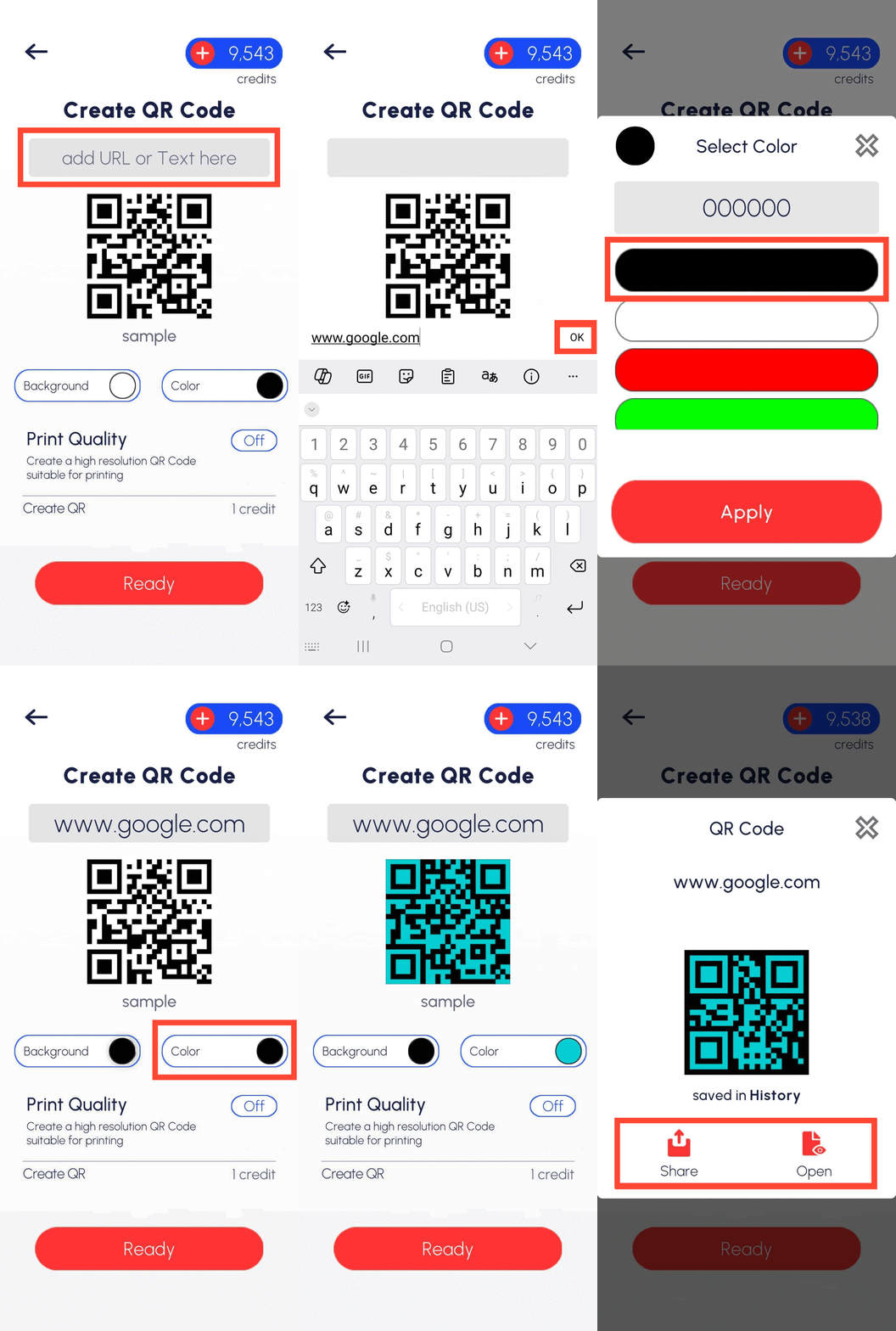
- Open the PDF Translator Pro mobile app.
- Select the QR Code option.
- Add your URL or text.
- Select the colors for your QR code.
- Adjust Print Quality as needed.
- Tap Ready.
- Your QR code is now ready to share.
The QR code you create will be available for download in your Menu > History.
This dual functionality makes PDF Translator Pro a versatile tool for both accessing information through existing QR codes and creating your own. It's useful for businesses, educators, and individuals who need to quickly share or access information via QR codes.
Back to blog

